
Automate EDI Orders Processing in NetSuite. Avoid data entry in multiple systems. Be EDI connected in Few weeks - Not Months
Benefits:
-
Shorter Implementation Time
-
Reduced IT Expenses
-
Improved Data Consistency
-
Scalability
Why Choose TPSynergy?
✅ Fully Managed Service
We Implement, Monitor, Maintain, and Support your EDI Integrations.
✅ 10+ Years of Integration Experience
Deep expertise in EDI, APIs, NetSuite, Oracle, Amazon, and supply chain automation.
✅ Built Around Your Business
Customized to your workflows, trading partners, and NetSuite environment.
✅ Complete Supply Chain Connectivity
Connect customers, suppliers, marketplaces, warehouses, carriers, and ERP systems.
✅ Direct Technical Support
-
Speak directly with integration experts who know your implementation.
Book a Free Integration Consultation
Or Let us Contact You.
TPSynergy's Retail EDI Experience
TPSynergy has more than 10 years of experience in implementation of EDI for many retailers. We can implement your EDI faster and smoother.




TPSynergy Net-Suite Integration Explained in a 2 Minute Video
FAQ:
1. What business processes can TPSynergy automate with NetSuite?
TPSynergy automates the complete order fulfillment process, including customer orders, EDI transactions, shipment processing, ASN (856), invoices (810), inventory updates, and integration with carriers such as UPS. Our platform supports both EDI and REST/API integrations with customers, suppliers, marketplaces, and logistics providers.
2. How long does a typical NetSuite integration take?
Most standard NetSuite integrations can be implemented in 2–4 weeks because TPSynergy already includes pre-built EDI maps and integration components. The implementation timeline depends primarily on your specific business rules, customizations, trading partners, and testing requirements.
3. Does TPSynergy work with customized NetSuite environments?
Yes. Every NetSuite implementation is different. TPSynergy is designed to work with your existing custom fields, workflows, business rules, and approval processes, minimizing disruption to your current operations.
4. What makes TPSynergy different from other EDI and integration providers?
Unlike one-size-fits-all integration platforms, TPSynergy configures each integration specifically for your business processes. You'll work directly with experienced integration specialists who understand EDI, NetSuite, APIs, and supply chain workflows, providing faster issue resolution and a more personalized implementation experience.
5. What kind of support do you provide after implementation?
We provide ongoing technical support by email, phone, and through our in-application support portal. In most cases, you'll communicate directly with the technical team responsible for your implementation, ensuring faster troubleshooting and continuity.
6. Can TPSynergy integrate NetSuite with Amazon, Oracle, Shopify, UPS, and other business systems?
Yes. TPSynergy integrates NetSuite with Amazon Vendor Central, Oracle Fusion Cloud, Shopify, UPS, FedEx, 3PL providers, customers, suppliers, and many other ERP, WMS, TMS, and eCommerce platforms using EDI, APIs, XML, JSON, and flat file integrations.
7. Can TPSynergy integrate with our existing warehouse or 3PL?
Yes. TPSynergy integrates NetSuite with warehouses, WMS solutions, 3PL providers, shipping carriers, and fulfillment partners, helping automate the entire order-to-cash process.
More Questions ?. Let us schedule a call to disucss in Detail.
TPSynergy Data Flow Architecture

TPSynergy API Integration Details
1. TPSynergy uses Oauth-2 connection as approved by NetSuite.
2. All Integrations are tested in Sandbox environment first
3. Standard API protocols Get/Post/Patch are used to synchronize data from and to NetSuite.
4. Sales orders are posted into NetSuite using API call https://xxxxx- sb1.suitetalk.api.netsuite.com/services/rest/record/v1/salesorder
5. Shipment data are posted into NetSuite using API call https://xxxxx-sb1.suitetalk.api.netsuite.com/services/rest/record/v1/salesorder/xxxxx/!transform/itemfulfillment
6. Invoice data extracted using SuiteQuery call https://xxxxxx-sb1.suitetalk.api.netsuite.com/services/rest/query/v1/suiteql?offset=1000
Download a technical white paper with more details.
Thanks. Download here.
Customer Success Story
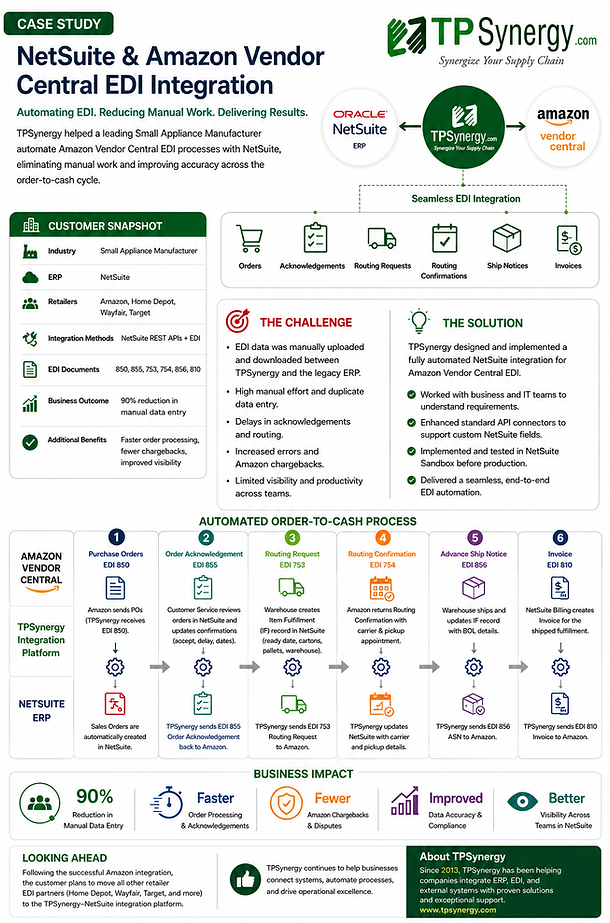
Download this case study in pdf format